Kerala Web Watch
Search

Kollam District Panchayat

http://kollamdp.lsgkerala.gov.in · audited last month · checked 17 minutes ago

Poor
Overall scoreno change

Six checks

  • Security38
  • Accessibility50
  • Content32
  • Government guidelines18
  • Performance86
  • Identity87

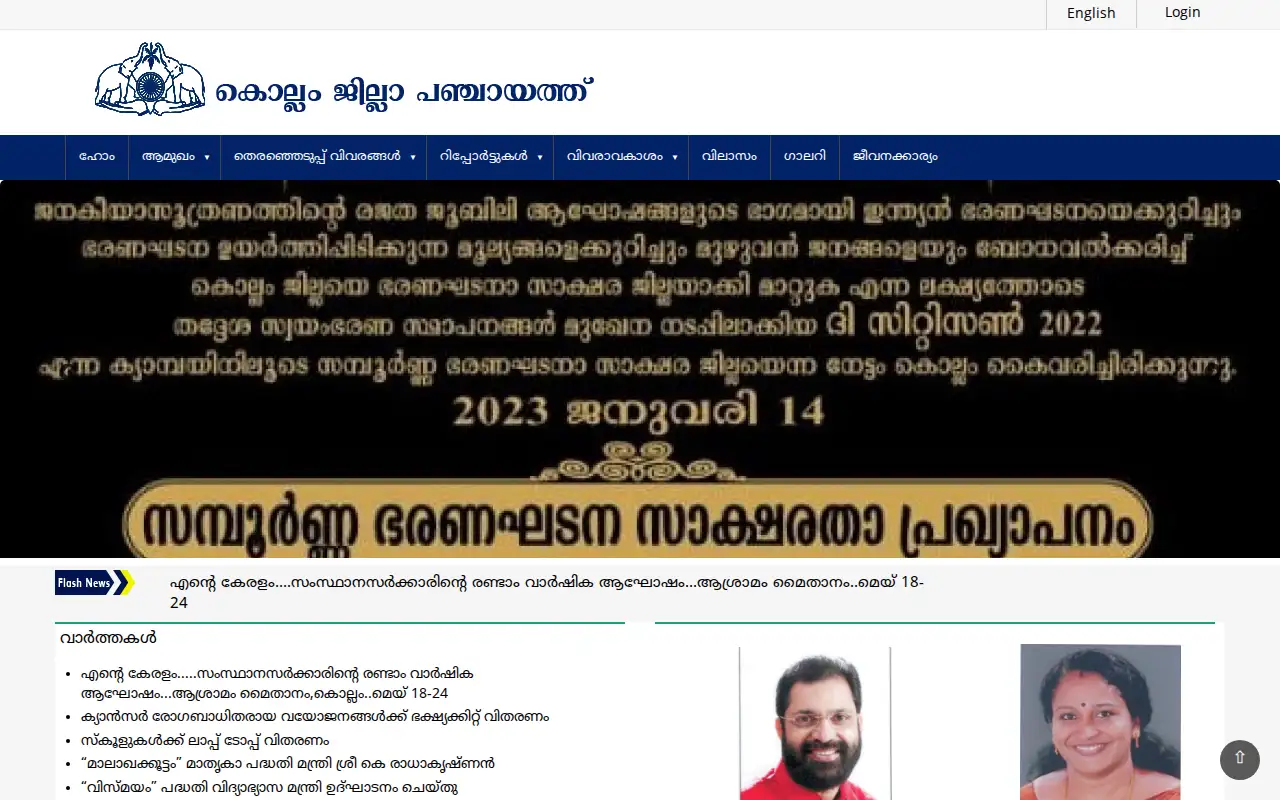
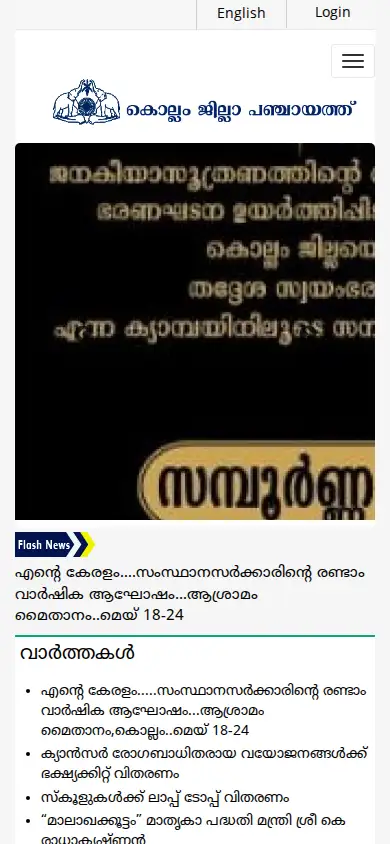
Screenshot

Desktop screenshot of Kollam District PanchayatMobile screenshot of Kollam District Panchayat

What to fix first

  1. Grade 3 — Fix soon Critical accessibility violations

    Automated testing found serious accessibility problems that are very likely to block some visitors, such as screen-reader users, from using this page at all.

  2. Grade 3 — Fix soon Broken internal links

    Some links on this site lead to pages that no longer exist or time out, which is frustrating and can hide information you were looking for.

  3. Grade 3 — Fix soon "Last updated" date is missing or very old

    There's no visible sign of when this page was last reviewed, or the date shown is over a year old -- you can't tell whether the information is still current.

  4. Grade 3 — Fix soon Uses a non-Unicode Malayalam font

    This page uses an old-style Malayalam font (like ML-TTKarthika or ISM/Matweb) that only displays correctly if you happen to have that exact font installed -- for everyone else, the text is unreadable garbled characters.

  5. Grade 3 — Fix soon Secure page loads insecure content

    The page is served securely but pulls in some scripts, styles or images over an insecure connection, weakening the protection the padlock is supposed to mean.

  6. Grade 3 — Fix soon Uses a JavaScript library with a known vulnerability

    The page loads a script library with a publicly known security flaw, which could let an attacker interfere with the page in your browser.

  7. Grade 4 — Plan a fix Serious accessibility violations

    Automated testing found accessibility problems likely to make parts of this page difficult to use for some visitors.

  8. Grade 4 — Plan a fix Text contrast is too low

    Some text is hard to read against its background, especially for visitors with low vision or in bright sunlight on a phone.

  9. Grade 4 — Plan a fix No Accessibility Statement

    There is no page explaining the site's accessibility commitments or how to report an accessibility problem.

  10. Grade 4 — Plan a fix No last-updated date shown

    There is no visible date telling you when the site (not just one page) was last updated.

  11. Grade 4 — Plan a fix No content-ownership statement

    There is no footer statement saying which department owns this content and who built/hosts the site, making it harder to tell an official site from an impersonation.

  12. Grade 4 — Plan a fix No Privacy Policy

    There is no statement telling you what personal information this site collects about you or what it does with it.

  13. Grade 4 — Plan a fix No sitemap page

    There is no page listing everything the site contains, making it harder to find something that isn't in the main menu.

  14. Grade 4 — Plan a fix Main content is slow to appear

    The largest visible element on the page (usually a heading or image) takes a long time to show up, which feels like the page is stuck.

  15. Grade 4 — Plan a fix No HSTS header

    The site does not tell browsers to always use the secure version, so a network attacker can sometimes still trick a browser into the insecure one.

  16. Grade 5 — Minor Running old, unsupported software

    The site is built on a content-management system or platform version old enough that it likely no longer receives security updates.

  17. Grade 5 — Minor Minor accessibility issues

    Smaller accessibility issues were found; each on its own is unlikely to block anyone, but they add up.

  18. Grade 5 — Minor Heading structure is missing or broken

    Screen-reader users often jump between sections by heading level; a missing top-level heading or skipped levels make the page harder to navigate that way.

  19. Grade 5 — Minor Possible keyboard-navigation trap

    Some interactive elements may be unreachable or invisible to someone who navigates by keyboard alone rather than a mouse.

  20. Grade 5 — Minor JavaScript errors on load

    The page's own code fails partway through loading, which can silently break some feature on the page without any visible error message.

  21. Grade 5 — Minor No meta description

    Search engines have nothing useful to show as a summary of this page in search results.

  22. Grade 5 — Minor No Copyright Policy

    There is no statement about who owns the content on this site and how it may be reused.

  23. Grade 5 — Minor No Disclaimer

    There is no disclaimer covering the accuracy or official status of the information on this site.

  24. Grade 5 — Minor No feedback mechanism

    There is no way to send feedback about the site itself.

  25. Grade 5 — Minor No Help page

    There is no page explaining how to use the site itself (navigation, search, common tasks).

  26. Grade 5 — Minor No Hyperlinking Policy

    There is no statement about how this site handles links to and from other websites.

  27. Grade 5 — Minor No Screen Reader Access page

    There is no page pointing screen-reader users to compatible software or usage tips for this site.

  28. Grade 5 — Minor No site search

    There is no way to search this site directly; you have to browse the menu to find anything.

  29. Grade 5 — Minor No Terms & Conditions / Terms of Use

    There is no page setting out the terms for using this site.

  30. Grade 5 — Minor No robots.txt

    This is a minor technical hygiene item about how search engines crawl the site; it rarely affects what you see directly.

  31. Grade 5 — Minor No sitemap.xml

    This helps search engines find every page on the site; without it, some pages may be harder to discover via search.

  32. Grade 5 — Minor Images are uncompressed or oversized

    Some images are far larger than they need to be for how they are displayed, slowing the page down for no visible benefit.

  33. Grade 5 — Minor No Content-Security-Policy header

    This is a technical defence-in-depth measure most visitors will never notice missing; it makes some attacks harder for the site to be tricked into if it ever has a bug.

  34. Grade 5 — Minor No Referrer-Policy header

    Without this, the full address of the page you came from (which can include personal details in a URL) may be leaked to other sites you click through to.

  35. Grade 5 — Minor Server discloses exact software versions

    The server announces precisely which software and version it runs, which helps an attacker look up known weaknesses in that exact version. This alone does not put you at risk.
Open issues · 35

Some of these issues are shared by most sites on the lsgkerala platform — see the platform page for the platform-wide findings.

High

High Secure page loads insecure content

The page is served securely but pulls in some scripts, styles or images over an insecure connection, weakening the protection the padlock is supposed to mean.

href="http://kollamdp.lsgkerala.gov.in/"

How to fix it

Change every http:// resource reference on the page to https://.

High Uses a JavaScript library with a known vulnerability

The page loads a script library with a publicly known security flaw, which could let an attacker interfere with the page in your browser.

jquery 3.4.1, bootstrap 3.2.0

How to fix it & reference

Update the affected library to a version without the known vulnerability.

Reference: OWASP A06:2021 Vulnerable and Outdated Components

High Critical accessibility violations

Automated testing found serious accessibility problems that are very likely to block some visitors, such as screen-reader users, from using this page at all.

1 critical violation(s)

How to fix it & reference

Run an accessibility scanner (e.g. axe) and fix every critical-impact violation it reports first.

Reference: WCAG 2.1 AA

High "Last updated" date is missing or very old

There's no visible sign of when this page was last reviewed, or the date shown is over a year old -- you can't tell whether the information is still current.

no "last updated" date found

How to fix it & reference

Show a genuine last-reviewed/updated date on every content page, and actually keep it current.

Reference: GIGW 3.0

High Uses a non-Unicode Malayalam font

This page uses an old-style Malayalam font (like ML-TTKarthika or ISM/Matweb) that only displays correctly if you happen to have that exact font installed -- for everyone else, the text is unreadable garbled characters.

ml-

How to fix it

Switch to a Unicode Malayalam font (e.g. Manjari, Noto Sans Malayalam) so the text reads correctly for everyone, with no font install required.

Medium

Medium No HSTS header

The site does not tell browsers to always use the secure version, so a network attacker can sometimes still trick a browser into the insecure one.

How to fix it & reference

Add a Strict-Transport-Security header once HTTPS is confirmed working sitewide.

Reference: OWASP Secure Headers

Medium Serious accessibility violations

Automated testing found accessibility problems likely to make parts of this page difficult to use for some visitors.

8 serious violation(s)

How to fix it & reference

Fix the serious-impact violations an accessibility scanner reports.

Reference: WCAG 2.1 AA

Medium Text contrast is too low

Some text is hard to read against its background, especially for visitors with low vision or in bright sunlight on a phone.

1 low-contrast element(s)

How to fix it & reference

Darken text or lighten backgrounds until the contrast ratio meets WCAG AA (4.5:1 for normal text).

Reference: WCAG 2.1 SC 1.4.3

Medium No sitemap page

There is no page listing everything the site contains, making it harder to find something that isn't in the main menu.

How to fix it & reference

Add a human-readable sitemap page linking every major section.

Reference: GIGW 3.0

Medium No Privacy Policy

There is no statement telling you what personal information this site collects about you or what it does with it.

How to fix it & reference

Publish a Privacy Policy page and link it from the footer of every page.

Reference: GIGW 3.0

Medium No Accessibility Statement

There is no page explaining the site's accessibility commitments or how to report an accessibility problem.

How to fix it & reference

Publish an Accessibility Statement with a way to report barriers.

Reference: GIGW 3.0

Medium No content-ownership statement

There is no footer statement saying which department owns this content and who built/hosts the site, making it harder to tell an official site from an impersonation.

How to fix it & reference

Add a footer statement: "Content owned by <department> — Designed, developed & hosted by <agency>".

Reference: GIGW 3.0

Medium No last-updated date shown

There is no visible date telling you when the site (not just one page) was last updated.

How to fix it & reference

Show a site-wide last-updated date, typically in the footer.

Reference: GIGW 3.0

Medium Main content is slow to appear

The largest visible element on the page (usually a heading or image) takes a long time to show up, which feels like the page is stuck.

10743.081ms

How to fix it

Optimise the largest above-the-fold image/element: compress it, size it correctly, and load it early.

Medium Running old, unsupported software

The site is built on a content-management system or platform version old enough that it likely no longer receives security updates.

Drupal 8 (unsupported major version)

How to fix it

Upgrade the CMS/platform to a currently-supported version.

Low

Low No Content-Security-Policy header

This is a technical defence-in-depth measure most visitors will never notice missing; it makes some attacks harder for the site to be tricked into if it ever has a bug.

How to fix it & reference

Add a Content-Security-Policy header, starting permissive and tightening it once nothing breaks.

Reference: OWASP Secure Headers

Low No Referrer-Policy header

Without this, the full address of the page you came from (which can include personal details in a URL) may be leaked to other sites you click through to.

How to fix it & reference

Add a Referrer-Policy header, e.g. "strict-origin-when-cross-origin".

Reference: OWASP Secure Headers

Low Server discloses exact software versions

The server announces precisely which software and version it runs, which helps an attacker look up known weaknesses in that exact version. This alone does not put you at risk.

PHP/7.0.33

How to fix it

Configure the web server to suppress or generalise the Server/X-Powered-By headers.

Low Minor accessibility issues

Smaller accessibility issues were found; each on its own is unlikely to block anyone, but they add up.

15 moderate/minor violation(s)

How to fix it & reference

Work through the moderate/minor findings from an accessibility scanner as time allows.

Reference: WCAG 2.1 AA

Low Heading structure is missing or broken

Screen-reader users often jump between sections by heading level; a missing top-level heading or skipped levels make the page harder to navigate that way.

no <h1>

How to fix it & reference

Add one <h1> per page and use heading levels in order without skipping.

Reference: WCAG 2.1 SC 1.3.1

Low Possible keyboard-navigation trap

Some interactive elements may be unreachable or invisible to someone who navigates by keyboard alone rather than a mouse.

tabindex="-1" alongside outline:none

How to fix it & reference

Make sure every interactive element can be reached and clearly seen with the keyboard's Tab key alone.

Reference: WCAG 2.1 SC 2.1.1

Low No meta description

Search engines have nothing useful to show as a summary of this page in search results.

How to fix it

Add a concise <meta name="description"> summarising each page.

Low JavaScript errors on load

The page's own code fails partway through loading, which can silently break some feature on the page without any visible error message.

6 console error(s): e.indexOf is not a function

How to fix it

Open the browser's developer console on this page and fix the reported script errors.

Low No feedback mechanism

There is no way to send feedback about the site itself.

How to fix it & reference

Add a feedback form or a dedicated feedback email address.

Reference: GIGW 3.0

Low No Terms & Conditions / Terms of Use

There is no page setting out the terms for using this site.

How to fix it & reference

Publish a Terms of Use page.

Reference: GIGW 3.0

Low No Copyright Policy

There is no statement about who owns the content on this site and how it may be reused.

How to fix it & reference

Publish a Copyright Policy page.

Reference: GIGW 3.0

Low No Disclaimer

There is no disclaimer covering the accuracy or official status of the information on this site.

How to fix it & reference

Publish a Disclaimer page.

Reference: GIGW 3.0

Low No Screen Reader Access page

There is no page pointing screen-reader users to compatible software or usage tips for this site.

How to fix it & reference

Publish a Screen Reader Access page (GIGW's traditional term for this).

Reference: GIGW 3.0

Low No Help page

There is no page explaining how to use the site itself (navigation, search, common tasks).

How to fix it & reference

Publish a Help page.

Reference: GIGW 3.0

Low No site search

There is no way to search this site directly; you have to browse the menu to find anything.

How to fix it & reference

Add a site search facility.

Reference: GIGW 3.0

Low Images are uncompressed or oversized

Some images are far larger than they need to be for how they are displayed, slowing the page down for no visible benefit.

How to fix it

Resize images to their display dimensions and compress them (WebP/AVIF where possible).

Low No robots.txt

This is a minor technical hygiene item about how search engines crawl the site; it rarely affects what you see directly.

robots.txt returned 404

How to fix it

Add a robots.txt that at least allows normal crawling.

Low No sitemap.xml

This helps search engines find every page on the site; without it, some pages may be harder to discover via search.

sitemap.xml returned 500

How to fix it

Generate and serve a sitemap.xml, and reference it from robots.txt.

43 checks passed
  • Hostname does not resolve
  • Server did not respond
  • Page does not load successfully
  • Site redirects to an unrelated domain
  • Domain shows a "for sale" / parking page
  • Server's default page is showing, not the site
  • Page is effectively empty
  • "Under construction" page only
  • Server is slow to start responding
  • Blocked from where we check from
  • Not served over HTTPS at all
  • HTTPS certificate is invalid or expired
  • Certificate is about to expire
  • Only an old, insecure TLS version is supported
  • No clickjacking protection
  • No X-Content-Type-Options header
  • Links to suspicious outside websites
  • Page language is missing or wrong
  • Images missing alt text
  • Form fields without labels
  • No "skip to content" link
  • Lighthouse accessibility score
  • Lighthouse performance score
  • Page layout jumps around while loading
  • Homepage is very large to download
  • Not set up for mobile screens
  • Buttons/links too small or close together on mobile
  • Placeholder text left on the live site
  • Uses obsolete web technology
  • "Best viewed in..." notice
  • Linked PDFs are missing
  • Broken images
  • No Malayalam version available
  • Page title is missing or generic
  • No favicon
  • No "Contact Us" page
  • No RTI / Public Information Officer details
  • No state/national emblem shown
  • Not on an official government domain
  • Missing pages return "200 OK" instead of a proper error
  • No canonical link tag
  • Missing UTF-8 charset or HTML5 doctype
  • Loads third-party trackers

Uptime — last 90 days

Technical facts

Final URL
https://kollamdp.lsgkerala.gov.in/
Server
nginx
Content management system
Drupal 8
Security certificate
Valid — expires in 27 days (Dec 16 03:11:32 2026 GMT)
Domain
lsgkerala.gov.in — a government (.gov.in/.nic.in-class) domain
Platform
lsgkerala

Actions

See all sites in Local Self Government →

See all sites in Kollam →